Choose your install method
Overview
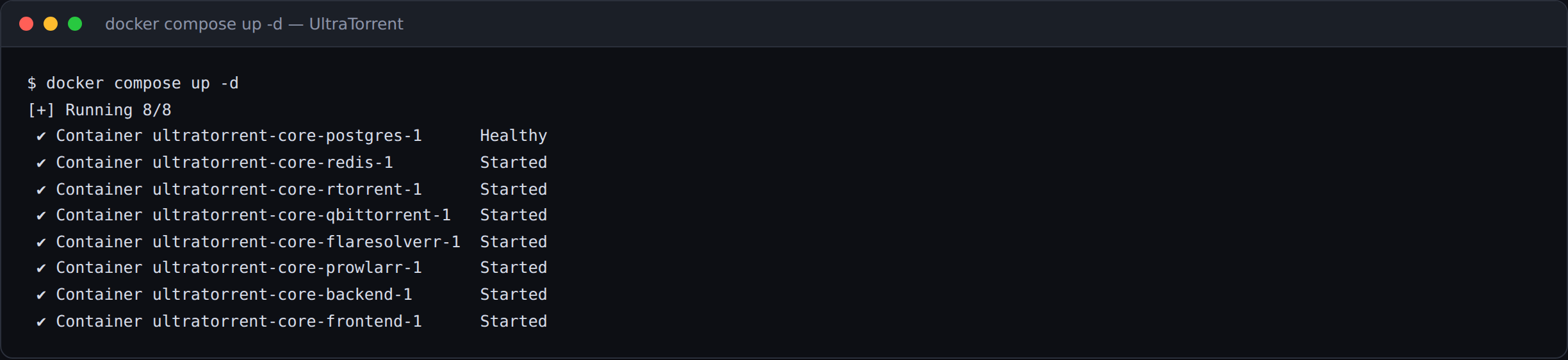
UltraTorrent ships as a Docker Compose stack: PostgreSQL, Redis, the NestJS API, the React web UI, and — behind opt-in Compose profiles — a bundled torrent engine, a Prowlarr indexer manager, a Cloudflare solver, and an edge reverse proxy.
That single fact simplifies the whole install story. Almost every "platform" in this section is just a Docker host. Synology, QNAP, Unraid, TrueNAS SCALE, Portainer, Proxmox, a Hetzner VPS — they differ in how you get a shell, where your volumes live, and which ports are already taken. They do not differ in how UltraTorrent runs.
So this section is deliberately shaped like that:
- Get UltraTorrent comes first: where the software actually comes from, and what is deliberately not published.
- Docker Compose is the authoritative guide. Every other page defers to it.
- Guided installer does that same install from one binary — plan, generate, deploy, seed, verify — for people who would rather not do it by hand.
- Platform pages are thin deltas: shell access, paths, port clashes, gotchas.
- Reverse proxy and TLS are cross-cutting and apply to all of them.
The Compose stack builds the images from source — there is no published registry image to docker pull. Your host therefore needs Docker, the source tree, and roughly 2 GB of free RAM for the first build (about 10–15 minutes; later starts are seconds). Base images are multi-arch, so x86-64 and ARM64 hosts both work.
The same is true of the software itself: there is nothing to download but the source. See Get UltraTorrent.
Video coming soon.
Decision tree
Comparison table
| Host | How you install | Difficulty | Shell needed? | Notes |
|---|---|---|---|---|
| Linux PC / server | Docker Engine + Compose plugin | Easy | Yes | The reference platform. Ubuntu, Debian, Fedora, Rocky. |
| Synology | Container Manager + SSH | Medium | Yes (once) | Well-grounded — UltraTorrent is deployed on Synology. Remap the UI port; DSM can strip container capabilities. |
| QNAP | Container Station + SSH | Medium | Yes | Well-grounded. The docker binary is not on PATH by default. QNAP's admin UI already owns port 8080. |
| Unraid | Docker Compose Manager plugin, or SSH | Medium | Yes | No Community Apps template exists — the stack builds from source. |
| TrueNAS SCALE | Docker / custom app | Medium | Yes | Depends heavily on your SCALE version's app engine. |
| Portainer | Stacks → Git repository | Easy | No | Nice if you already run Portainer. Seeding still needs a container console. |
| Proxmox | VM (recommended) or LXC running Docker | Medium | Yes | Proxmox itself does not run Docker — you install it inside a guest. |
| Cloud VPS | Docker Engine + firewall + TLS | Medium | Yes | AWS, Azure, GCP, Oracle, Hetzner, DigitalOcean, Vultr. Never expose it without HTTPS and a firewall. |
What gets installed
The only port published by default is the web UI (8080, changeable via FRONTEND_PORT). The backend is not published to the host — the frontend's nginx proxies /api/ and /ws/ to it over the internal Docker network.
Which engine?
UltraTorrent is multi-engine. Two engines ship bundled behind Compose profiles:
Bundled rTorrent (--profile rtorrent) | Bundled qBittorrent (--profile qbittorrent) | |
|---|---|---|
| Setup | Zero config — add it in the UI as scgi-tcp / host rtorrent / port 5000 | Grab the first-run password from the logs, then register it |
| Footprint | Very small | Small |
| Stability at scale | Degrades. rTorrent 0.9.8 has an unfixed upstream priority_queue_insert crash that fires more often the more active torrents you run | Comfortable with thousands of torrents |
| Best for | A modest library, a first install | A large library |
The bundled engine is rTorrent 0.9.8 (jesec v0.9.8-r16, the newest build in that lineage). It carries a long-standing upstream bug — internal_error: priority_queue_insert(...) called on an invalid item, fired during tracker-announce scheduling — with no fix in the 0.9.8 line. Frequency scales with the number of active torrents: effectively zero at a handful, roughly ten crashes a day at ~750.
Each crash exits the process; Docker's restart: unless-stopped relaunches it and rTorrent reloads its saved session, so no torrents are lost — transfers just pause briefly and re-announce. Mitigate by keeping the active-torrent count modest, or run qBittorrent instead for a large library. UDP trackers and DHT are already disabled in the bundled config to remove secondary crash variants.
Before you start
You will need, on the host:
- Docker Engine with the Compose v2 plugin (
docker compose, space — not the legacydocker-compose). - ~2 GB free RAM for the build, 2+ GB disk for the images, plus whatever your downloads need.
- The source tree (
git clone, or a downloaded ZIP) — see Get UltraTorrent. - Five secrets you generate yourself:
POSTGRES_PASSWORD,JWT_ACCESS_SECRET,JWT_REFRESH_SECRET,ENCRYPTION_KEY,ADMIN_PASSWORD. There are no insecure defaults — the stack refuses to start without them.
By hand, or by installer?
Both produce the same stack. The difference is who runs the steps.
| Docker Compose | Guided installer | |
|---|---|---|
| What you run | cp .env.example .env, edit, bring the stack up, seed | ultratorrent-install install --repo <checkout> |
| Secrets | You generate five and paste them in | Generated for you, preserved on every re-run |
| Engine credentials | Fetch qBittorrent's first-run password from its log | Pre-seeded; written to engine-credentials.txt |
| Prowlarr + FlareSolverr | You paste the API key into Settings and add the proxy | Wired automatically |
| Database seed | A second command you must remember | Part of the run |
| "Did it work?" | You open the UI and find out | Sign-in verified through the published UI before it claims success |
| Getting it | Already in your checkout | Built from clients/installer — nothing to download |
| Interactive | n/a | Not yet — answers are flags, not questions |
Read the Compose guide either way: the installer automates it, it does not replace understanding it.
Next steps
- Get the source onto the host.
- Follow the Docker Compose guide — the authoritative install — or hand it to the guided installer.
- Skim your platform page for the deltas that apply to your host.
- Exposing it beyond your LAN? Reverse proxy → TLS.
- Then Quick start and your first download.
Checklist
- I know which host I am installing on
- I have the source on it (Get UltraTorrent)
- Docker Engine + Compose v2 are installed on it
- I have ~2 GB free RAM and a couple of GB of disk
- I have decided rTorrent (small library) vs qBittorrent (large library)
- I know whether this box will be reachable from the internet (→ reverse proxy + TLS)
- I have somewhere safe to keep the five secrets I am about to generate
FAQ
Is there a one-click app / Docker Hub image?
Not yet. Every install builds from source with docker compose up -d --build. The closest thing is the guided installer, which is one command — but you build that from source too.
Is there an install script I can download and run?
There is an installer, ultratorrent-install, but it is not published as a downloadable file: you build it from the checkout. See Guided installer.
Can I run it without Docker? Yes — Node 20, PostgreSQL 14+ and Redis 6+, from source. It is a development path, not a supported production one. See Linux.
Does it need a GPU / transcoding? No. UltraTorrent acquires and organizes media; it does not transcode or stream.
Can I use my existing qBittorrent / rTorrent? Yes — skip both profiles and register your own engine under Infrastructure → Engines. See Engines.
See also
- Get UltraTorrent — where the software comes from
- Docker Compose install — the authoritative guide
- Guided installer —
ultratorrent-install, end to end - Upgrading — updates, rollback, migration safety
- Environment variables — every variable, generated from
.env.example - Concepts — what the pieces are
- Troubleshooting
- Security