Reverse proxy
Overview
On a LAN you do not need a reverse proxy — open http://<host>:8080 and you are done.
You want one when you need a hostname instead of a port, HTTPS, or one entrypoint in front of several self-hosted apps.
UltraTorrent's UI is live: torrent progress, engine health, RSS runs, import progress — all pushed over a WebSocket at /ws/. A proxy that does not forward the Upgrade and Connection headers produces a UI that looks fine, loads, lets you log in — and then never updates. Progress bars sit at 0%. This is by far the most common reverse-proxy mistake, and every config below handles it.
Video coming soon.
Prerequisites
- A working Docker Compose install.
- A DNS name pointing at the host (for a public setup).
- Ports 80/443 free on the host, or a proxy that already owns them.
Requirements
A reverse proxy is cheap: ~64 MB RAM and negligible CPU for any of the options below. The only real requirement is that it can proxy WebSockets.
Ports
| Port | Who listens | Notes |
|---|---|---|
| 80 / 443 | Your reverse proxy | The only ports that should face the internet |
| 8080 (host) | frontend container | Bind it to 127.0.0.1 once a proxy fronts it — see Best practices |
| 8080 (container) | nginx inside the frontend image | The container listens on 8080, not 80 — see the note below |
| 4000 (container) | backend | Internal only; never published |
The image is built on nginx-unprivileged, which runs as uid 101 and therefore cannot bind a privileged port. Inside the Docker network the frontend is http://frontend:8080.
This bites hand-written proxy configs: pointing an upstream at frontend:80 yields a 502 Bad Gateway, because nothing is listening there. Use frontend:8080.
The deploy/Caddyfile shipped with the repo (the proxy profile) routes to frontend:8080 correctly. If you are running a checkout from before that fix and the bundled proxy 502s, that is why — update it, or pull.
Volumes
Only your proxy's own state (certificates, ACME account). UltraTorrent's volumes are untouched by a proxy.
Permissions
None specific — but if your proxy binds 80/443, it needs the capability to do so (root, CAP_NET_BIND_SERVICE, or a container that already has it).
Two ways to route
Option A is what you want. The frontend's own nginx already proxies /api/ and /ws/ to the backend, complete with the WebSocket upgrade headers — so a single upstream gets you a fully working app, and there is exactly one place that can be misconfigured.
Option B (what the bundled Caddyfile does) shaves one hop off API calls. Use it only if you have a reason to; you must then get the /ws/ upgrade headers right yourself.
Every config below uses Option A unless noted.
Step-by-step
1. Tell UltraTorrent its public origin
In .env:
CORS_ORIGIN=https://torrents.example.com
Then recreate the backend:
docker compose up -d backend
The SPA calls the API on a relative path (/api), so it is same-origin and CORS is mostly moot — but the value is used for allowed browser origins and should reflect reality. It accepts a comma-separated list.
2. Bind the UI port to localhost
If the proxy runs on the same host, stop exposing 8080 to your whole LAN:
# docker-compose.override.yml
services:
  frontend:
    ports: !override
      - "127.0.0.1:8080:8080"
!override requires a recent Compose v2. If your version rejects it, edit the ports: entry in docker-compose.yml directly — remember that a plain override file appends ports rather than replacing them.
If the proxy runs in the same Compose project, drop the host mapping entirely and let the proxy reach frontend:8080 over the internal network.
3. Configure the proxy
- Traefik
- NGINX
- Nginx Proxy Manager
- Caddy
- HAProxy
- Cloudflare Tunnel
Labels on the frontend service, assuming a Traefik with an websecure entrypoint and a letsencrypt resolver already running on a shared network:
# docker-compose.override.yml
services:
  frontend:
    labels:
      - "traefik.enable=true"
      - "traefik.docker.network=traefik_proxy"
      - "traefik.http.routers.ultratorrent.rule=Host(`torrents.example.com`)"
      - "traefik.http.routers.ultratorrent.entrypoints=websecure"
      - "traefik.http.routers.ultratorrent.tls.certresolver=letsencrypt"
      # The container listens on 8080 (nginx-unprivileged), NOT 80.
      - "traefik.http.services.ultratorrent.loadbalancer.server.port=8080"
    networks: [internal, traefik_proxy]

networks:
  traefik_proxy:
    external: true
WebSockets: Traefik proxies them transparently — no extra middleware, no header juggling. It just works, provided you did not strip Upgrade/Connection with a custom headers middleware.
Static-config reminder (traefik.yml), if you do not already have it:
entryPoints:
  web:
    address: ":80"
    http:
      redirections:
        entryPoint: { to: websecure, scheme: https }
  websecure:
    address: ":443"

certificatesResolvers:
  letsencrypt:
    acme:
      email: you@example.com
      storage: /letsencrypt/acme.json
      httpChallenge:
        entryPoint: web
A standalone NGINX on the host, in front of the published 127.0.0.1:8080:
# /etc/nginx/sites-available/ultratorrent.conf
map $http_upgrade $connection_upgrade {
    default upgrade;
    ''      close;
}

upstream ultratorrent {
    server 127.0.0.1:8080;
    keepalive 32;
}

server {
    listen 80;
    server_name torrents.example.com;
    return 301 https://$host$request_uri;
}

server {
    listen 443 ssl http2;
    server_name torrents.example.com;

    ssl_certificate     /etc/letsencrypt/live/torrents.example.com/fullchain.pem;
    ssl_certificate_key /etc/letsencrypt/live/torrents.example.com/privkey.pem;

    # Torrent files can be large-ish; uploads of .torrent files must not 413.
    client_max_body_size 64m;

    location / {
        proxy_pass http://ultratorrent;
        proxy_http_version 1.1;

        # --- REQUIRED for the live UI -------------------------------------
        proxy_set_header Upgrade    $http_upgrade;
        proxy_set_header Connection $connection_upgrade;
        # ------------------------------------------------------------------

        proxy_set_header Host              $host;
        proxy_set_header X-Real-IP         $remote_addr;
        proxy_set_header X-Forwarded-For   $proxy_add_x_forwarded_for;
        proxy_set_header X-Forwarded-Proto $scheme;

        # Long-lived WebSocket: do not time it out after 60s.
        proxy_read_timeout  86400s;
        proxy_send_timeout  86400s;
        proxy_buffering     off;
    }
}
sudo ln -s /etc/nginx/sites-available/ultratorrent.conf /etc/nginx/sites-enabled/
sudo nginx -t && sudo systemctl reload nginx
The map block must be at http level (outside server). Putting proxy_set_header Connection "upgrade" unconditionally also works but breaks plain HTTP keep-alive; the map is the correct form.
In the NPM web UI:
Hosts → Proxy Hosts → Add Proxy Host → Details
| Field | Value |
|---|---|
| Domain Names | torrents.example.com |
| Scheme | http |
| Forward Hostname / IP | the Docker host's IP, or frontend if NPM shares the Compose network |
| Forward Port | 8080 |
| Cache Assets | off |
| Block Common Exploits | on |
| Websockets Support | ✅ ON — this is the whole ballgame |
SSL tab: request a new Let's Encrypt certificate, enable Force SSL and HTTP/2.
Advanced tab — paste this so the WebSocket does not get killed by the default 60-second read timeout:
proxy_read_timeout 86400s;
proxy_send_timeout 86400s;
proxy_buffering off;
client_max_body_size 64m;

The NPM Add Proxy Host → Details tab, with Forward Port 8080 and the Websockets Support toggle switched on and highlighted.
Nginx Proxy Manager is not part of this project's own deployments. The settings above are the standard ones for a WebSocket app; verify against your NPM version.
Caddy proxies WebSockets transparently and gets a Let's Encrypt certificate on its own. This is the least error-prone option.
Standalone Caddy (Caddyfile):
torrents.example.com {
    encode gzip
    reverse_proxy 127.0.0.1:8080
}
That is the entire config. HTTPS, HTTP→HTTPS redirect, certificate renewal and WebSocket upgrade are all automatic.
The bundled proxy profile. The repo ships deploy/Caddyfile and a caddy:2-alpine service behind --profile proxy. Replace the :80 site label with your domain to get automatic HTTPS — and fix the upstream port while you are in there:
# deploy/Caddyfile
torrents.example.com {
	encode gzip

	# WebSocket + API straight to the backend
	@api path /api/* /ws/*
	handle @api {
		reverse_proxy backend:4000
	}

	# Everything else to the SPA. NOTE: the frontend image is nginx-unprivileged
	# and listens on 8080 — not 80.
	handle {
		reverse_proxy frontend:8080
	}
}
docker compose --profile proxy up -d
The file in the repo currently reads reverse_proxy frontend:80, while the frontend container listens on 8080. If the bundled proxy 502s, correct that line as shown above.
Caddy needs 80 and 443 free on the host, and your domain's DNS must already resolve to it for the ACME HTTP challenge.
# /etc/haproxy/haproxy.cfg
global
    log stdout format raw local0
    maxconn 4096

defaults
    mode    http
    log     global
    option  httplog
    option  forwardfor
    timeout connect 5s
    timeout client  1h      # long, so the WebSocket survives
    timeout server  1h
    timeout tunnel  24h     # <-- the WebSocket tunnel timeout: REQUIRED

frontend https_in
    bind :80
    bind :443 ssl crt /etc/haproxy/certs/torrents.example.com.pem alpn h2,http/1.1
    http-request redirect scheme https unless { ssl_fc }

    http-request set-header X-Forwarded-Proto https if { ssl_fc }
    http-request set-header X-Forwarded-Port  %[dst_port]

    acl host_ut hdr(host) -i torrents.example.com
    use_backend ultratorrent if host_ut

backend ultratorrent
    # HAProxy passes Upgrade/Connection through in HTTP mode; `timeout tunnel`
    # above is what keeps the upgraded connection alive.
    option httpchk GET /api/system/live
    http-check expect status 200
    server ut1 127.0.0.1:8080 check
The certificate must be a combined PEM (fullchain + private key concatenated). See TLS.
The killer setting here is timeout tunnel. Without it, the WebSocket dies at timeout client and the UI silently stops updating.
A tunnel gives you a public HTTPS hostname with no open inbound ports at all — ideal behind CGNAT or a locked-down router.
Add cloudflared to the stack:
# docker-compose.override.yml
services:
  cloudflared:
    image: cloudflare/cloudflared:latest
    restart: unless-stopped
    command: tunnel --no-autoupdate run
    environment:
      TUNNEL_TOKEN: ${CLOUDFLARE_TUNNEL_TOKEN}
    networks: [internal]
    depends_on: [frontend]
# .env
CLOUDFLARE_TUNNEL_TOKEN=eyJhIjoi...        # from the Zero Trust dashboard
In the Cloudflare Zero Trust dashboard → Networks → Tunnels → your tunnel → Public Hostname:
| Field | Value |
|---|---|
| Subdomain | torrents |
| Domain | example.com |
| Service type | HTTP |
| URL | frontend:8080 — the service name on the shared Compose network |
Cloudflare proxies WebSockets by default. If the live UI does not update, check that WebSockets is enabled under Network in the Cloudflare dashboard for that zone.
Once the tunnel works, remove the host ports: mapping from frontend entirely — nothing needs to be reachable from your LAN.
Cloudflare Tunnel is not part of this project's own deployments. The mapping above is the standard cloudflared pattern; the exact dashboard wording changes over time.
The tunnel is for the web UI, not for BitTorrent traffic — peers connect directly to your engine, not through Cloudflare. Also mind Cloudflare's terms regarding proxied non-HTML content.
Verification
1. The page loads over HTTPS at your hostname, with a valid padlock.
2. The API answers through the proxy:
curl -s https://torrents.example.com/api/system/live
3. The WebSocket upgrades. This is the test that actually matters:
curl -i -N \
  -H "Connection: Upgrade" \
  -H "Upgrade: websocket" \
  -H "Sec-WebSocket-Version: 13" \
  -H "Sec-WebSocket-Key: dGhlIHNhbXBsZSBub25jZQ==" \
  https://torrents.example.com/ws/
Expected — the server agrees to upgrade:
HTTP/1.1 101 Switching Protocols
Upgrade: websocket
Connection: Upgrade
Anything else — 200, 400, 404, 502 — means your proxy is eating the upgrade. Go back and fix the Upgrade / Connection headers.
4. The real test. Open the UI, start a download, and watch the progress bar move without refreshing. If you have to hit F5 to see progress, the WebSocket is not connected.
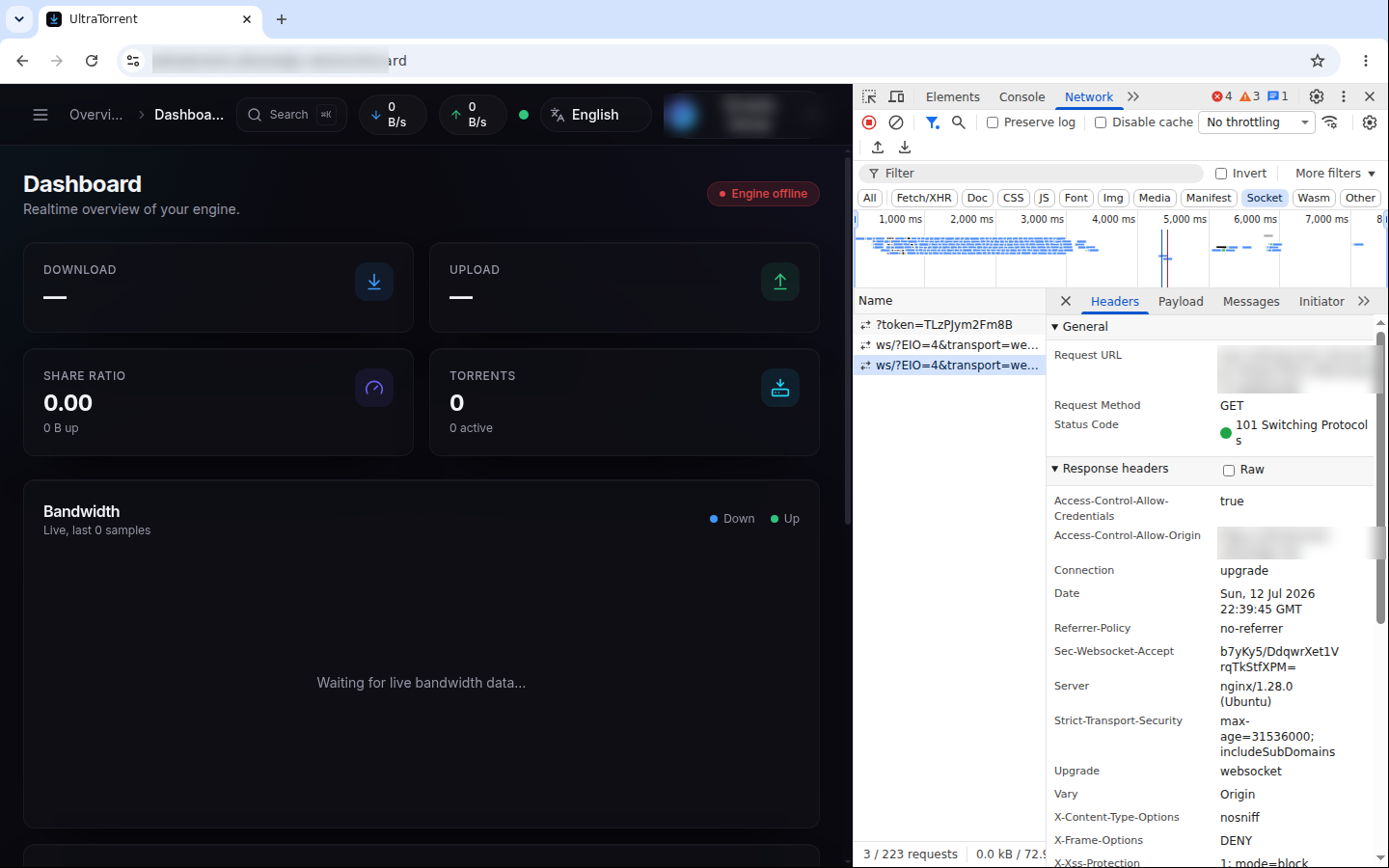
To check it yourself: DevTools → Network → Socket, then reload. The
ws/?EIO=4&transport=websocket request must report 101 Switching Protocols, with
Connection: upgrade and Upgrade: websocket in the response headers. Anything else —
most often a 200 or a 400 — means your proxy stripped the upgrade headers, and no
amount of restarting UltraTorrent will fix it.
HTTPS
Every config above assumes TLS terminates at the proxy. Certificates, Let's Encrypt, custom CAs and DNS-01: TLS.
Updates
A reverse proxy is orthogonal to UltraTorrent updates — rebuilds do not touch it. The one thing to re-check after an upgrade: if you edited deploy/Caddyfile in the repo, a git pull may conflict with your change. Keep proxy config outside the repo (or in docker-compose.override.yml, which is not tracked) so upgrades stay clean.
Backups
Back up your proxy's certificate store — caddy_data, Traefik's acme.json, /etc/letsencrypt, or NPM's data/ + letsencrypt/ folders. Losing it is survivable (certificates re-issue) but you will hit Let's Encrypt rate limits if you do it repeatedly.
Troubleshooting
| Symptom | Cause | Fix |
|---|---|---|
| 502 Bad Gateway from the bundled Caddy proxy | deploy/Caddyfile routes to frontend:80, but the nginx-unprivileged image listens on 8080 | Change it to reverse_proxy frontend:8080 |
| 502 / connection refused generally | Proxy cannot reach the upstream — wrong port, wrong hostname, or not on the same Docker network | Upstream is frontend:8080 (same network) or 127.0.0.1:8080 (same host). Attach the proxy to the internal network if you use service names |
| UI loads, logs in, but nothing ever updates | The /ws/ upgrade is being dropped | Run the 101 Switching Protocols curl test above. Add Upgrade/Connection headers (NGINX), enable Websockets Support (NPM), or set timeout tunnel (HAProxy) |
| Live updates work for ~60 seconds, then stop | The proxy's read timeout is killing the idle WebSocket | proxy_read_timeout 86400s (NGINX/NPM), timeout tunnel 24h (HAProxy) |
| Login works but a refresh logs you out | Cookies/headers mangled, or X-Forwarded-Proto missing so the app thinks it is on HTTP | Forward Host and X-Forwarded-Proto |
Static assets 404 under a subpath (e.g. /ultratorrent/) | The SPA is built for the root path — its asset URLs are absolute | Serve UltraTorrent on its own hostname or subdomain, not a subpath |
Uploading a .torrent file → 413 Request Entity Too Large | Proxy body-size limit | client_max_body_size 64m (NGINX/NPM) |
| Certificate issuance fails | DNS not pointing at the proxy yet, or 80/443 not reachable for the HTTP-01 challenge | See TLS |
| Everything works on the LAN, nothing from outside | Firewall or router | Only 80/443 should be forwarded — and never 4000 or 5000 |
Best practices
- Terminate TLS at the proxy, and let the proxy be the only thing on 80/443.
- Use Option A (single upstream,
frontend:8080) unless you have a specific reason not to. Fewer places to get the WebSocket wrong. - Bind the container's host port to
127.0.0.1once a proxy fronts it, so the raw HTTP port is not reachable from your LAN. - Never proxy the backend (4000) or SCGI (5000) to the internet. The API is reachable through
/api/already; SCGI is unauthenticated remote control. - Set long read/tunnel timeouts — a WebSocket is a long-lived idle connection by design.
- Keep proxy config out of the repo so
git pullnever conflicts with it. - Give it its own hostname, not a subpath.
- Add authentication in front of it if it is public — a Cloudflare Access policy, or your proxy's basic-auth — as defence in depth on top of UltraTorrent's own login. See Security.
FAQ
Do I need a reverse proxy on my LAN?
No. http://<host>:8080 works fine.
Can I run UltraTorrent under example.com/torrents?
Not supported — the SPA is built for the root path. Use a subdomain.
Which proxy is the least trouble? Caddy or Traefik: both handle WebSocket upgrades transparently and issue certificates themselves.
Do I still need the bundled proxy profile if I run my own proxy?
No. Do not start it — it would fight for ports 80/443.
Does the WebSocket need its own hostname or port?
No. It is served at /ws/ on the same origin as the UI.
Why does the connection test to Prowlarr pass while grabs fail? That is not a proxy issue — it is the SSRF guard. See Docker Compose → optional profiles.
Checklist
- Proxy reaches the upstream —
frontend:8080(same network) or127.0.0.1:8080(same host) -
/ws/returns 101 Switching Protocols through the proxy - Read / tunnel timeouts raised well above 60 seconds
-
client_max_body_size(or equivalent) at least 64 MB -
CORS_ORIGINin.envmatches the public URL; backend recreated - HTTPS works, HTTP redirects to it
- Host port 8080 bound to
127.0.0.1(or removed entirely) - Backend (4000) and SCGI (5000) are not exposed
- A download's progress bar moves live, with no page refresh
- Proxy config lives outside the git repo
See also
- TLS & certificates
- Docker Compose install
- Cloud / VPS install — where a proxy is mandatory
- Security · Troubleshooting
- Environment variables —
CORS_ORIGIN