TLS & HTTPS
Overview
UltraTorrent's containers speak plain HTTP and are designed to sit behind something that terminates TLS. That is deliberate: certificate handling belongs in one place, and every serious deployment already has a reverse proxy.
So "enabling HTTPS" means: put a proxy in front and give it a certificate. This page covers the certificate half; Reverse proxy covers the routing half.
You have three realistic options:
| Use when | Effort | |
|---|---|---|
| Let's Encrypt — HTTP-01 | The box is reachable from the internet on port 80 | Lowest |
| Let's Encrypt — DNS-01 | LAN-only, behind CGNAT, or you want a wildcard | Medium — needs a DNS provider API token |
| Custom / internal CA cert | Corporate PKI, or a homelab with its own CA | Medium — you must distribute the CA to clients |
Video coming soon.
Prerequisites
- A working Docker Compose install and a reverse proxy.
- A domain name you control. A LAN-only IP address cannot get a public certificate — you need a hostname, even for an internal-only service (DNS-01 issues certificates for hostnames that never resolve publicly).
- For HTTP-01: port 80 reachable from the internet, and DNS already pointing at the host.
Requirements
Negligible — TLS termination costs a few MB of RAM. What it costs is attention: an expired certificate is an outage.
Ports
| Port | Needed for |
|---|---|
| 80 | HTTP-01 ACME challenge and the HTTP→HTTPS redirect. Keep it open even after you have a certificate — renewal uses it |
| 443 | HTTPS |
| — | DNS-01 needs no inbound port at all |
Volumes
Whatever your proxy stores certificates in. Back it up:
| Proxy | Certificate store |
|---|---|
Caddy (bundled proxy profile) | the caddy_data volume |
| Traefik | acme.json |
| NGINX + certbot | /etc/letsencrypt |
| Nginx Proxy Manager | its data/ and letsencrypt/ folders |
| HAProxy | your combined-PEM directory |
Permissions
Private keys must be readable only by the process that uses them:
sudo chmod 600 /etc/haproxy/certs/torrents.example.com.pem
sudo chown root:root /etc/haproxy/certs/torrents.example.com.pem
Never commit a key to git; never put one in .env.
How it fits together
Note the last line: because TLS terminates at the proxy, the browser's WebSocket is automatically wss:// — you do not configure that anywhere. It only works if your proxy forwards the upgrade; see Reverse proxy.
Step-by-step
- Caddy (easiest)
- Let's Encrypt + NGINX (certbot)
- Traefik
- Custom / corporate certificate
Caddy obtains, installs and renews a Let's Encrypt certificate with zero configuration beyond naming your domain.
Edit deploy/Caddyfile (or your own Caddyfile) so the site label is your domain rather than :80:
torrents.example.com {
	encode gzip

	@api path /api/* /ws/*
	handle @api {
		reverse_proxy backend:4000
	}

	handle {
		# nginx-unprivileged listens on 8080 — not 80.
		reverse_proxy frontend:8080
	}
}
docker compose --profile proxy up -d
docker compose logs -f proxy        # watch the certificate get issued
Requirements: DNS for torrents.example.com already points at this host, and ports 80 and 443 are reachable. Caddy handles the HTTP→HTTPS redirect and renewal itself.
Wildcard / DNS-01 with Caddy needs a DNS-provider plugin, which means a custom Caddy image:
FROM caddy:2-builder AS builder
RUN xcaddy build --with github.com/caddy-dns/cloudflare
FROM caddy:2-alpine
COPY /usr/bin/caddy /usr/bin/caddy
*.example.com {
	tls {
		dns cloudflare {env.CLOUDFLARE_API_TOKEN}
	}
	reverse_proxy frontend:8080
}
HTTP-01 — the standard path when the host is publicly reachable.
- Ubuntu / Debian
- Fedora / Rocky
sudo apt update && sudo apt install -y certbot python3-certbot-nginx
sudo dnf install -y certbot python3-certbot-nginx
With your NGINX proxy config already in place and listening on port 80:
sudo certbot --nginx -d torrents.example.com
certbot edits the vhost, installs the certificate, and sets up the redirect. Renewal is installed as a systemd timer:
systemctl list-timers | grep certbot
sudo certbot renew --dry-run          # prove renewal works BEFORE you need it
DNS-01 / wildcard — no inbound port needed:
sudo apt install -y python3-certbot-dns-cloudflare
sudo install -m 600 /dev/null /etc/letsencrypt/cloudflare.ini
echo 'dns_cloudflare_api_token = <your-scoped-token>' | sudo tee /etc/letsencrypt/cloudflare.ini

sudo certbot certonly \
  --dns-cloudflare \
  --dns-cloudflare-credentials /etc/letsencrypt/cloudflare.ini \
  -d 'example.com' -d '*.example.com'
Then point NGINX at /etc/letsencrypt/live/example.com/fullchain.pem and privkey.pem, and reload after each renewal:
# /etc/letsencrypt/renewal-hooks/deploy/reload-nginx.sh
#!/bin/sh
systemctl reload nginx
sudo chmod +x /etc/letsencrypt/renewal-hooks/deploy/reload-nginx.sh
Static config (traefik.yml):
certificatesResolvers:
  letsencrypt:
    acme:
      email: you@example.com
      storage: /letsencrypt/acme.json
      httpChallenge:
        entryPoint: web

  # Wildcard / no open ports:
  letsencrypt-dns:
    acme:
      email: you@example.com
      storage: /letsencrypt/acme-dns.json
      dnsChallenge:
        provider: cloudflare
        resolvers: ["1.1.1.1:53"]
# the Traefik service
environment:
  CF_DNS_API_TOKEN: ${CLOUDFLARE_API_TOKEN}
volumes:
  - ./letsencrypt:/letsencrypt
Then on the frontend service:
labels:
  - "traefik.http.routers.ultratorrent.tls.certresolver=letsencrypt"
  # wildcard variant:
  # - "traefik.http.routers.ultratorrent.tls.certresolver=letsencrypt-dns"
  # - "traefik.http.routers.ultratorrent.tls.domains[0].main=example.com"
  # - "traefik.http.routers.ultratorrent.tls.domains[0].sans=*.example.com"
acme.json must be mode 0600 or Traefik refuses to use it.
You have a certificate from a commercial CA or your company's internal PKI. You will typically get:
certificate.crt— your leaf certificateintermediate.crt(or a bundle) — the chainprivate.key— the key
Build the chain properly. Browsers need leaf then intermediates, in that order:
cat certificate.crt intermediate.crt > fullchain.pem
- NGINX
- HAProxy
- Caddy
ssl_certificate     /etc/ssl/ultratorrent/fullchain.pem;
ssl_certificate_key /etc/ssl/ultratorrent/private.key;

ssl_protocols       TLSv1.2 TLSv1.3;
ssl_prefer_server_ciphers off;
ssl_session_cache   shared:SSL:10m;
HAProxy wants one file: fullchain and key concatenated.
cat fullchain.pem private.key > /etc/haproxy/certs/torrents.example.com.pem
sudo chmod 600 /etc/haproxy/certs/torrents.example.com.pem
bind :443 ssl crt /etc/haproxy/certs/torrents.example.com.pem alpn h2,http/1.1
torrents.example.com {
	tls /etc/ssl/ultratorrent/fullchain.pem /etc/ssl/ultratorrent/private.key
	reverse_proxy frontend:8080
}
Mount both files into the proxy container read-only.
Internal CA / homelab. mkcert produces certificates trusted by machines you install its root CA on:
mkcert -install
mkcert torrents.home.lan
Every device that will open the UI — including phones — must trust that root CA, or you get a browser warning. For a homelab with more than two or three devices, DNS-01 with a real domain is less work than distributing a CA.
Verification
The chain is complete and the dates are right:
openssl s_client -connect torrents.example.com:443 -servername torrents.example.com < /dev/null 2>/dev/null \
  | openssl x509 -noout -subject -issuer -dates
subject=CN = torrents.example.com
issuer=C = US, O = Let's Encrypt, CN = R11
notBefore=Jul 12 09:14:02 2026 GMT
notAfter=Oct 10 09:14:01 2026 GMT
No chain gaps (the classic "works in Chrome, fails on Android" bug):
openssl s_client -connect torrents.example.com:443 -servername torrents.example.com < /dev/null 2>&1 | grep -i "verify"
Verify return code: 0 (ok)
HTTP redirects to HTTPS:
curl -sI http://torrents.example.com | head -1
# HTTP/1.1 301 Moved Permanently
The app works over TLS, WebSocket included:
curl -s https://torrents.example.com/api/system/live
Then open the UI and confirm a download's progress bar updates live — that proves wss:// is tunnelling correctly through your TLS terminator.
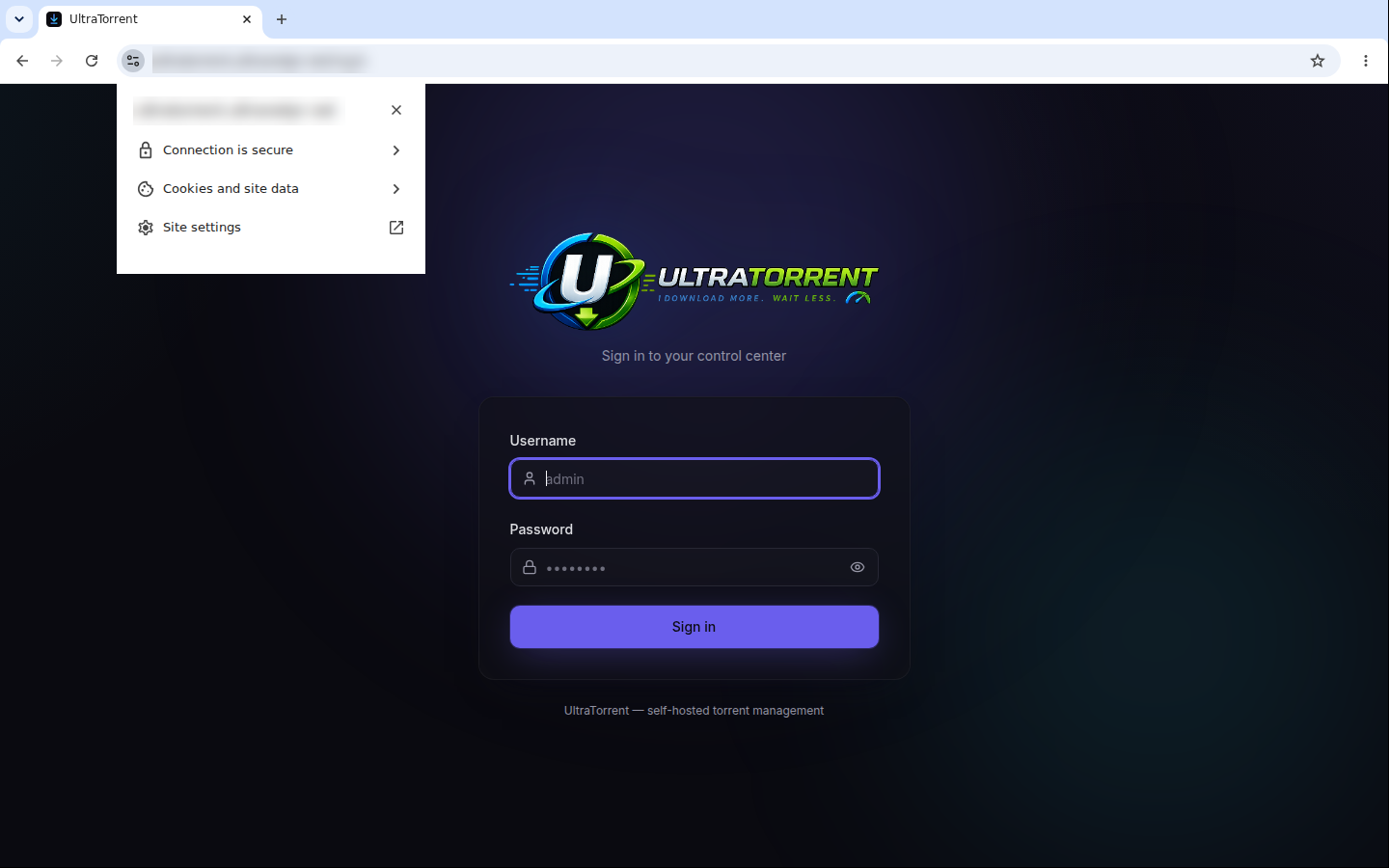
Chrome 117 and later replaced the padlock icon with a site information icon (the two sliders). Click it: a working certificate reads "Connection is secure", and Connection is secure → Certificate is valid shows the issuer. A misconfigured chain says "Not secure" here even when the page still loads.
Reverse proxy
TLS and routing are two halves of one job. Configure the routing (and the mandatory WebSocket upgrade) in Reverse proxy.
Updates
Certificates are independent of UltraTorrent upgrades — rebuilding the stack does not touch them, as long as your proxy's certificate store is a volume or a host path outside the repo.
After any certificate renewal, the proxy must reload. Caddy and Traefik do it themselves. NGINX and HAProxy need a deploy hook (see the certbot tab above).
Backups
Back up the certificate store (caddy_data, acme.json, /etc/letsencrypt, your PEM directory) alongside your .env and database dump. Losing it is recoverable — but Let's Encrypt rate-limits duplicate certificates (5 per identical name set per week), so repeatedly losing it will lock you out of re-issuance for days.
Troubleshooting
| Symptom | Cause | Fix |
|---|---|---|
| ACME fails: "Timeout during connect" on HTTP-01 | Port 80 is not reachable from the internet | Open 80 on the firewall and the router. Cloud hosts: check the security group. Or switch to DNS-01, which needs no inbound port |
| ACME fails: "Invalid response … 404" | Something else is answering on port 80, or the proxy is not serving /.well-known/acme-challenge/ | Make the proxy the only thing on port 80 |
| "too many certificates already issued" | Let's Encrypt rate limit — usually from a loop of failed retries | Wait it out (a week), and test against --staging / the ACME staging directory next time |
| Certificate valid in Chrome, untrusted on Android/iOS | Missing intermediate — you served the leaf only | Serve the fullchain: cat certificate.crt intermediate.crt > fullchain.pem |
ERR_SSL_PROTOCOL_ERROR | You are hitting an HTTP-only port over HTTPS (e.g. https://host:8080) | The container speaks plain HTTP. Go through the proxy's 443 |
| Padlock is valid, but the UI never updates | TLS is fine; the WebSocket upgrade is being dropped | See Reverse proxy → verification |
| Mixed-content warnings in the console | Something is requesting http:// from an https:// page | The SPA uses relative URLs by default. Check CORS_ORIGIN and any custom VITE_API_URL build arg |
Traefik ignores acme.json | Wrong file permissions | chmod 600 acme.json |
| Certificate expired | Renewal ran but the proxy never reloaded | Add a deploy hook that reloads the proxy; verify with certbot renew --dry-run |
Browser warning on a mkcert certificate | The device does not trust your root CA | Install the root CA on that device — or move to DNS-01 with a real domain |
Best practices
- Automate renewal, then prove it works —
certbot renew --dry-run— long before day 89. - Prefer Caddy or Traefik if you have no strong opinion: they issue and renew certificates with no cron job to forget.
- Use DNS-01 for LAN-only installs. A public certificate for a private hostname, no inbound ports, no browser warnings, no CA to distribute.
- Always serve the full chain, never the bare leaf.
- Keep port 80 open for redirects and HTTP-01 renewals, even once HTTPS works.
- TLS 1.2 minimum, TLS 1.3 preferred.
- Back up the certificate store with everything else.
- Never terminate TLS inside the app containers — they are built to sit behind a proxy.
- Public deployment? TLS is table stakes, not the whole story. Also read Security.
FAQ
Can I get a certificate for a bare IP address? Not from Let's Encrypt. Use a hostname (DNS-01 works even if it only resolves on your LAN).
Do I need to change anything in UltraTorrent for HTTPS?
Only CORS_ORIGIN in .env, to your public https:// origin. The SPA uses relative URLs, so wss:// follows automatically.
Can I terminate TLS on the frontend container directly? No — it is a plain-HTTP nginx by design. Use a proxy.
Self-signed for a quick test?
Fine for a lab, but every device will warn, and some tooling will refuse. mkcert is a better version of the same idea.
Does the bundled Caddy profile renew automatically?
Yes, as long as it keeps running and caddy_data persists.
Checklist
- A hostname exists and (for HTTP-01) resolves to the host
- The reverse proxy is working over plain HTTP first
- Ports 80 and 443 reachable (HTTP-01) — or a DNS API token in place (DNS-01)
- Certificate issued, fullchain served
-
openssl s_clientreportsVerify return code: 0 (ok) - HTTP redirects to HTTPS
- Renewal automated and dry-run tested
- Proxy reloads on renewal (deploy hook, for NGINX/HAProxy)
-
CORS_ORIGINupdated to thehttps://origin; backend recreated - The live UI still updates over
wss:// - Certificate store included in backups
- Private key is
0600, owned by the proxy's user, and not in git
See also
- Reverse proxy — the routing half, and the WebSocket requirement
- Cloud / VPS install — where HTTPS is mandatory
- Docker Compose install
- Security · Troubleshooting