Modules
UltraTorrent is not a monolith with a settings page bolted on. Every feature is a module — a self-contained NestJS module that declares a manifest: its id, whether it is required, the modules it depends on, the permissions it introduces, the API routes it owns, the WebSocket events it emits, and the scheduled jobs it runs.
At boot, the module registry loads every manifest, validates it, resolves the dependency graph, and decides what is active. This page is the map: what each module is for, how they fit together, and which page to read next.
Why it works this way
A module registry buys you four things that matter in a self-hosted product:
- You can turn things off. Don't want library management? Disable Media Manager and its UI, routes, and jobs go quiet. Nothing else breaks, because the registry knows who depends on whom.
- Nothing half-loads. Manifests are validated at startup — a dependency on an unknown module, or a circular dependency, is rejected with a clear error rather than a mysterious runtime failure.
- Permissions are declared, not discovered. Each manifest lists the permissions it introduces; the registry syncs them into the permission catalog so RBAC can assign them from day one.
- Adding a feature is additive. A new module is a new manifest plus a guarded controller — see Creating modules.
There is no licensing, edition, product key, or feature gating in UltraTorrent. Every module ships in the one community product. Access is governed only by RBAC permissions.
There used to be a core / community tier on every manifest. It was removed, because it conflated two unrelated things — which edition a module belonged to (there is only one) and whether you are allowed to switch it off. Only the second was ever real, and it is now a plain required flag.
Required and optional
| Kind | Meaning |
|---|---|
| Required | Always available, cannot be disabled. The system would not be coherent without it — auth, RBAC, engine, torrents, RSS, files, settings, audit, notifications, Media Server Analytics. |
| Optional | Can be toggled by an admin. Most are on by default; a few ship off, which is a deliberate design decision rather than an oversight — see below. |
Module state
For every module the registry computes a state, and the reason for it:
| State | Meaning | What to do |
|---|---|---|
enabled | Dependencies satisfied and turned on. | Nothing. |
disabled | Not running. The reason says which of two causes applies. | See the next table. |
missing_dependency | It wants to run, but something it depends on is off. | Enable the dependency first. |
license_required | The availability seam withheld it. | Cannot occur in this product — every module is available. The state exists so the registry has somewhere honest to put the answer if that ever changes. |
A disabled module always says why, and the two causes are not the same thing:
| Reason | Meaning |
|---|---|
disabled by an administrator | Somebody switched it off. There is a stored override row and an audit entry naming them. |
off by default — never enabled on this installation | Nobody has touched it. Its manifest ships enabledByDefault: false and no one has opted in. |
That distinction is worth stating plainly, because these two once shared one message. A module that is deliberately off out of the box — Media Discovery is the one that ships that way — reported itself as though an administrator had disabled it, which sends you hunting the audit log for a change nobody made.
enabled requires all dependencies to be enabled, computed as a fixpoint — so disabling a module cascades to everything that depends on it. Disabling RSS, for example, takes Release Scoring and Media Acquisition Intelligence down with it, because both declare RSS as a hard dependency.
Two rules protect you from breaking the install:
- Core modules cannot be disabled.
- A module may only be disabled if no enabled module depends on it.
Every enable/disable is recorded as a module event and an audit-log entry.
How the modules relate
Solid arrows are declared manifest dependencies (the registry enforces them). Dashed arrows are runtime collaborations — one module using another's data, or calling directly into it, without a hard dependency. The dashed boxes are subsystems that are not registry modules: Indexers is RBAC-gated but has no manifest, and Prowlarr is an optional external container.
Read the graph as a story:
- auth / rbac decide who you are and what you may do. Nothing else runs without them.
- engine talks to your torrent client; torrents is the UI and lifecycle on top of it.
- rss watches feeds; release_scoring grades what it finds; media_acquisition_intelligence (Smart Download) decides whether a graded release is actually worth acquiring, and asks the engine to grab it. media_discovery sits upstream of all of that and answers a different question — not "is this release good enough" but "should we be watching for this title at all". It creates the watchlist entry and the RSS rule, then stops; it never downloads. It is off by default.
- files gives every path-touching feature a safe sandbox; media_manager organises finished downloads into libraries; media_server_analytics reports on what people actually watch.
- automation is the reactive layer — torrent sync, RSS, and the subtitle triggers call into it directly when something happens. There is no event bus; nothing fans in generically.
The modules
Downloading
| Module | Required | What it does |
|---|---|---|
| Torrents | ✅ | The torrent list, detail view, lifecycle actions, and bulk operations. |
| Engines | ✅ | The torrent-client abstraction — connect, health-check, and sync your engine. |
| Indexers | (subsystem) | Torznab/Newznab search endpoints, and the bridge that turns a missing episode into a download. |
| Prowlarr | (companion) | Optional external indexer manager, run as a Compose companion. |
Acquiring
| Module | Required | What it does |
|---|---|---|
| RSS automation | ✅ | Feeds, rules, ranked match candidates, and TV airing-status awareness. |
| Smart Download | — | The explainable acquisition decision engine: what to grab, when, which release, and whether to upgrade. |
| Missing Episodes | — | Diffs the IMDb episode catalogue against your library to find the gaps. |
| Media Discovery | — | Finds what is coming out and decides what to start monitoring. Ships off by default. |
Organising
| Module | Required | What it does |
|---|---|---|
| Media Manager | — | Scan, identify, enrich, rename, and organise your media libraries. |
| Subtitle Intelligence | ✅ | Find, score, validate, install, and synchronize the best subtitle for every title. |
| Media Server Analytics | ✅ | Plex/Jellyfin/Emby/Kodi monitoring, watch history, reports, and newsletters. |
| File Manager | ✅ | Path-safe browsing, file operations, trash, and the cleanup wizard. |
Reacting
| Module | Required | What it does |
|---|---|---|
| Automation | ✅ | The trigger → condition → action rule engine. |
Administering
| Module | Required | What it does |
|---|---|---|
| Users & roles | ✅ | User management, role assignment, 2FA. |
| API keys | ✅ | Programmatic access for scripts and integrations. |
| Audit log | ✅ | The append-only trail of every sensitive action. |
| System | ✅ | Health probes, settings, and the module registry itself. |
Not every module has a guide page yet. The Module reference is generated from the manifests and is always complete — it currently lists 27 modules, including Notifications, Media Intake, Library Cleanup Center and the Console API, which have no hand-written page here.
Managing modules
Modules are managed at Administration → Modules (/modules), which requires modules.view to see and modules.manage to change.
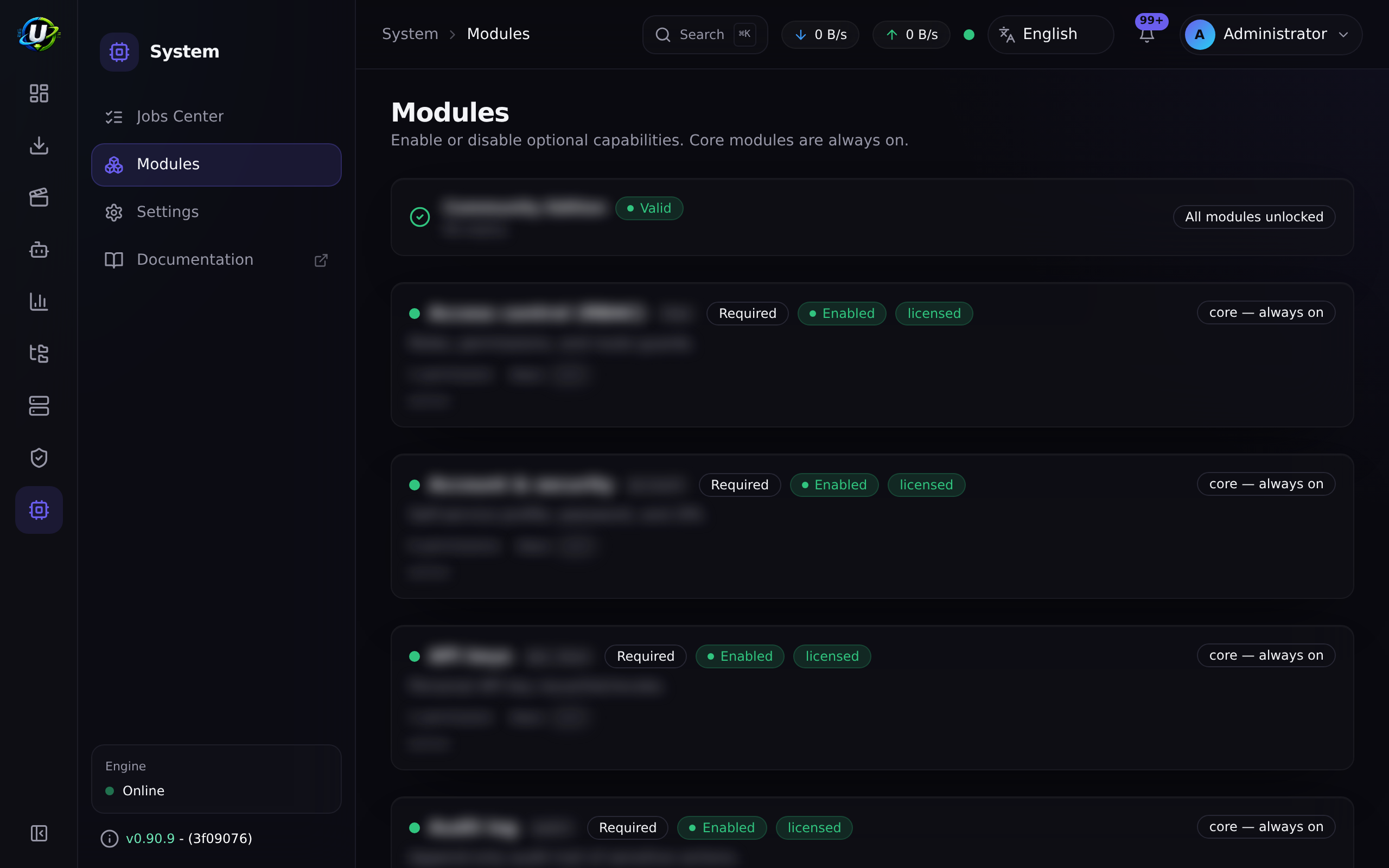
The page lists every module with its state, dependencies, permissions, and health. Required modules render their toggle as locked. An optional module whose dependents are still enabled refuses to be disabled, and tells you which module is holding it.
The equivalent API surface:
| Method | Path | Permission |
|---|---|---|
| GET | /api/modules | modules.view |
| GET | /api/modules/enabled | authenticated (this is what drives the client navigation) |
| GET | /api/modules/:id | modules.view |
| GET | /api/modules/:id/manifest | modules.view |
| GET | /api/modules/:id/health | modules.view |
| POST | /api/modules/:id/enable | modules.manage |
| POST | /api/modules/:id/disable | modules.manage |
Video coming soon.
Real-world examples
A minimal download box
You want a headless torrent client with a good web UI and nothing else. Leave the core modules alone (they're mandatory anyway), and disable Media Manager, Release Scoring, and Media Acquisition Intelligence at Administration → Modules. The Media, Release Scoring, and Media Acquisition nav groups disappear, their routes 404 for non-admins, their scheduled jobs stop ticking, and the app gets measurably quieter.
A full media pipeline
You want RSS to find episodes, Smart Download to pick the best release and skip what you already own, and Media Manager to file the result into a Plex-shaped library. That is: rss + release_scoring + media_acquisition_intelligence + media_manager, all enabled (the default). Start at Quick start, then work through RSS → Smart Download → Media Manager.
Troubleshooting
| Symptom | Cause | Fix |
|---|---|---|
| A nav entry vanished after an upgrade | The module is disabled, or you lost the permission that gates it. | Check Administration → Modules for its state, then check your role at Administration → Users → Roles. Module enablement is never authorization — see RBAC. |
| "Cannot disable: module X depends on it" | Another enabled module declares this one as a hard dependency. | Disable the dependent module first, or leave this one on. |
A module shows missing_dependency | Something it depends on is disabled. | Enable the dependency; the state recomputes as a fixpoint. |
| The backend refuses to start with a manifest error | A manifest references an unknown module id, or a cycle was introduced. | This is a code-level error, not a config one. See Creating modules. |
| An admin can still open a disabled module's page | Deliberate — users with modules.manage keep access so they can re-enable it. | Nothing to fix. |
Best practices
- Disable what you do not use. Every enabled module costs you scheduled jobs, WebSocket traffic, and attack surface.
- Grant permissions, not roles-by-vibes. Read Permissions once and build roles deliberately.
- Treat the audit log as the record. Every enable/disable is audited; use it when something changes and nobody remembers why.
- Enable one module at a time when you're first setting up, and verify each before moving on.
Common mistakes
- Assuming a hidden nav entry means the route is protected. It does not. The nav is a convenience layer; the backend RBAC guard is the enforcement point.
- Disabling
rssto "quieten things down" — it cascades to Release Scoring and Smart Download, which is almost never what you wanted. Disable the leaf module instead. - Expecting a disabled module's data to be deleted. Disabling stops the routes and jobs; it does not drop tables. Re-enabling picks up where you left off.
FAQ
Is there a paid tier or a licence key? No. Every module is in the community product. The registry consults an availability seam that always answers "yes" — it exists so the code has a single place to ask the question, not to gate anything.
Does disabling a module delete its data? No. It stops the module's routes, jobs, and UI. The database rows stay.
Why can't I disable a required module? Because the rest of the system assumes it. Auth, RBAC, the engine, and the audit log are not optional in any coherent configuration.
How do I add my own module? Build the NestJS module, add a manifest, guard the controller, and add the nav entry. The full walkthrough is at Creating modules.
Where do I see exactly which permissions a module introduces?
Its manifest, surfaced at GET /api/modules/:id/manifest and rendered on the Module reference page.
Checklist
- Open Administration → Modules. Expected: every module listed with a state badge and a reason.
- Confirm required modules show a locked toggle. Expected: no disable control.
- Find a module that is off by default. Expected: its reason reads off by default, not disabled by an administrator.
- Disable one optional module (e.g. Release Scoring). Expected: its nav entry disappears for non-admins, an audit row is written, and its reason now names an administrator.
- Try to disable
rsswhile Smart Download is enabled. Expected: refused, naming the dependent module. - Re-enable the module you disabled. Expected: nav entry returns, no data lost.
See also
- Core concepts — the vocabulary used across every module page.
- Module reference — the auto-generated manifest table.
- Permissions reference — every permission string.
- Creating modules — build your own.
- Glossary